Have you ever looked at a friend's iPhone and admired its clean, minimalist interface? Or perhaps you're an Android user who simply craves a visual refresh without buying a new phone. The beauty of Android has always been its incredible customizability, and one of the most popular ways to flex that muscle is by using a launcher. Apps like HiPhone Launcher OS Phone: Fast offer a fascinating proposition: they can transpose the distinctive look and feel of an iPhone onto your Android device in seconds.
What Exactly is a Launcher?
Before we dive into the specifics, it's helpful to understand what a launcher does. In simple terms, a launcher is the app that controls your home screen, app drawer, and the overall navigation feel of your Android phone. It's the first thing you see when you unlock your device. When you install a new launcher from the Google Play Store, you're essentially replacing that core interface with a new one. Your apps, widgets, and notifications all remain, but the way you access and see them can change dramatically.
The iPhone Aesthetic on Android
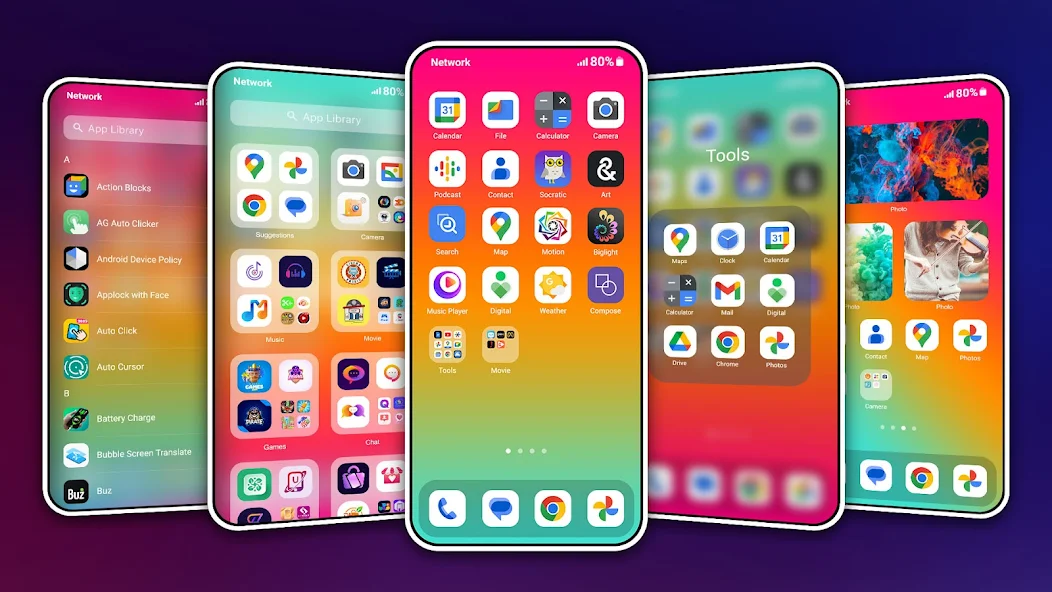
The core appeal of a launcher like HiPhone Launcher is its ability to mimic the iOS environment. For Android users who are curious about the iPhone's ecosystem, or for those who simply prefer its visual language, this is a zero-cost way to experiment. The launcher typically reorganizes your apps into a familiar iOS-style layout, often placing all icons directly on the home screens without a traditional Android app drawer. The control center, the settings icons, and even the lock screen can be reskinned to closely resemble an iPhone.
A Look Under the Hood: Key Features
Beyond just the visual veneer, these launchers pack a variety of functional features designed to enhance speed and convenience. They aim to combine the look you want with the efficiency you need.
- Smart Search Functionality: One of the highlighted features is an intelligent search accessible by swiping down anywhere on the home screen. This allows you to quickly find apps, contacts, or information without navigating through menus.
- Customization Galore: You're not just stuck with one look. You can typically customize the size, color, and position of various interface elements, and choose from a collection of built-in wallpapers to personalize your new home screen.
- Quick Toggles: The launcher often provides fast access to essential phone functions. You can switch silent mode, flight mode, or Bluetooth on and off with a single tap, saving you time digging into settings.
- Security Options: Many of these launchers also include their own lock screen, offering additional security layers like password or pattern locks.
The User Experience: Fast, Fluid, and Fresh
The developers behind HiPhone Launcher emphasize speed and efficiency in their description. The goal is to create an interface that not only looks good but feels responsive. "Fast" is right in the app's subtitle, suggesting that the transformation shouldn't come at the cost of performance. For users with older or budget Android devices, a well-optimized launcher can sometimes even make the phone feel snappier by replacing a heavier, manufacturer-customized interface.
What You Should Know About Permissions
This is a crucial section for any savvy app user. The app's description includes important notes about permissions that deserve your attention. It states it requires accessibility service permissions to perform certain functions, like opening the recent apps dialog or simulating a back button press. This is common for launchers that offer advanced gesture controls. It also mentions needing to "query all packages," which essentially means it needs to see a list of all apps installed on your phone to display them correctly in its interface.
These permissions are functional, but they are also powerful. It's always wise to:
- Understand the "Why": The app explains why it needs these permissions. Ensure the reason makes sense for a launcher.
- Download from Trusted Sources: Only install such apps from the official Google Play Store to minimize security risks.
- Check Recent Reviews: See if other users have reported any issues related to performance or battery life after granting these permissions.
A Note on Data Privacy
A quick look at the data safety section for this app reveals a mixed picture. It states that data like location, app activity, and device IDs may be shared with third parties and collected. Furthermore, it notes that data is not encrypted and cannot be deleted. This is a significant consideration. Free apps often rely on advertising or data aggregation for revenue, and launchers, which have deep access to your phone, are in a position to collect a lot of information. This trade-off between customization and privacy is a personal one. Users who are highly privacy-conscious may want to explore paid launcher alternatives or those with a clearer, more restrictive data policy.
Who Is This Launcher For?
Given its feature set and privacy profile, HiPhone Launcher is best suited for a specific type of user:
- The Curious Customizer: Someone who loves to tinker with their phone's look and isn't overly concerned about data collection in exchange for a free, fun tool.
- The iPhone Admirer: An Android user who has always wondered what it's like to use an iPhone and wants to try the experience without switching ecosystems.
- The Boredom Fighter: Anyone who's simply tired of looking at the same old home screen and wants a quick, dramatic, and free refresh.
Making an Informed Choice
The world of Android launchers is vast and exciting. HiPhone Launcher offers a tempting gateway into that world, especially for those drawn to the iOS aesthetic. It promises speed, customization, and a familiar yet fresh interface. However, the information provided about data handling serves as an important reminder. The best app choice is always an informed one. Weigh the fun and functionality against your personal comfort level with the app's permissions and data practices. If the trade-off feels right, you're just a download away from giving your phone a whole new personality.
Conclusion: A Fresh Coat of Paint for Your Digital Life
Ultimately, changing your phone's launcher is one of the simplest and most satisfying ways to make your device feel new again. It's a low-commitment, high-reward form of personalization. Apps like HiPhone Launcher demonstrate the incredible flexibility of the Android platform. They let you borrow design languages from other ecosystems and make them your own. So, if you're ready for a change and have considered the privacy aspects, go ahead and explore. Your phone's next look is just a tap away.